

实习过程中对STM32G0系开发板OTA功能开发时遇到的一些问题和解决办法,主要涉及Bootloader程序的跳转和APP分区思路问题。
- Bootloader 跳转到APP区后发生卡死的情况。
- 双APP分区时只能跳转到其中某一个分区,无法跳转到另一分区的情况。
During internship OTA development on an STM32G0 board, I ran into several issues and summarized the fixes, mainly around Bootloader jump logic and APP partition strategy.
- The system hangs after Bootloader jumps to the APP region.
- With dual APP partitions, Bootloader can jump to only one partition instead of both.
Bootloader程序跳转后程序卡死问题
先简单说明程序跳转的操作,就是设置PC指针位置+堆栈指针位置,PC指针指向地址应该是 \([程序烧录地址] + 4\)。CBT6后缀的开发板HAL库代码可以参考下面几句:
1 | |
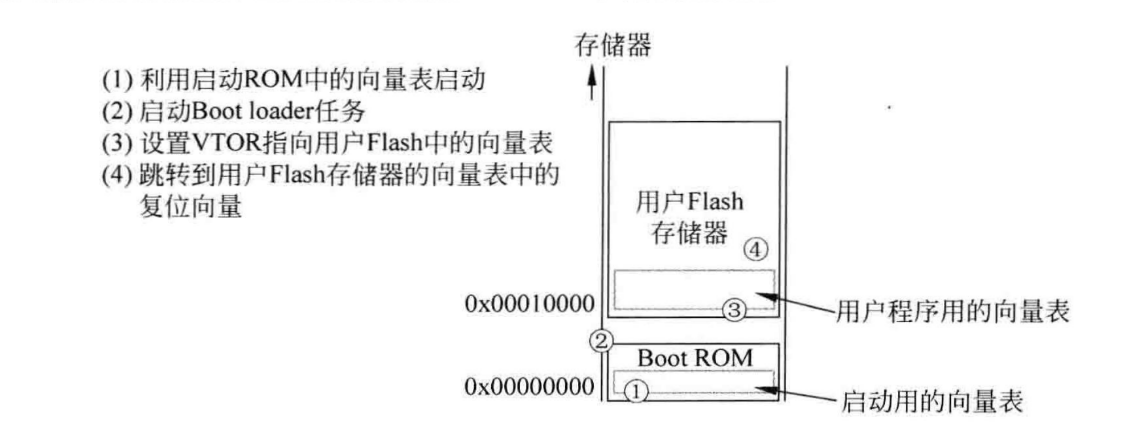
解决方法
Cortex M系列芯片中,除了M0以外,其它芯片都保留有VTOR寄存器用于重定位中断向量指针。G0系列开发板使用的是M0+芯片,可以使用该寄存器。因此在程序跳转前,给VTOR寄存器赋值相应地址就行。向量表地址根据上面的示意图,就是程序开始位置。完整跳转函数代码如下:
1 | |
双APP分区下Bootloader只能跳转到其中某一个分区问题
双APP分区是笔者为了在没有eeprom的情况下实现OTA首先构想的方法,也就是分Bootloader + flag + AB区。OTA更新思路如下: 1. 程序启动默认进入A区; 2. 发生OTA请求,将新程序写入B区; 3. 写入成功则将flag区对应地址标志位置为有效; 4. 让程序进入死循环,由看门狗重启系统; 5. Bootloader验证程序通过后跳入B区执行,此时A区作为新的下载区。
上述方法的优点就是始终保证有一个分区是有可执行程序的,这样即使OTA失败甚至写入被强制中断,也有一个有效区可以执行。除此之外有效利用程序flash空间,减少单个区域擦写次数,延长flash寿命。
不过上述方法忽略了程序本身的地址指针问题。在使用各类工具编译完成后,我们得到的二进制执行文件中,其实保留了程序的起始地址等信息。这段地址信息一般是在bin文件的开头部分(其实也就是前一个问题中提到的中断向量表地址)。当硬件执行bin程序时,会先读取这些地址信息,跳转到对应位置去执行。实际上我们给相同程序设置不同的烧写位置,其编译生成的bin文件是不同的。看下面的对比可以更直观一些:
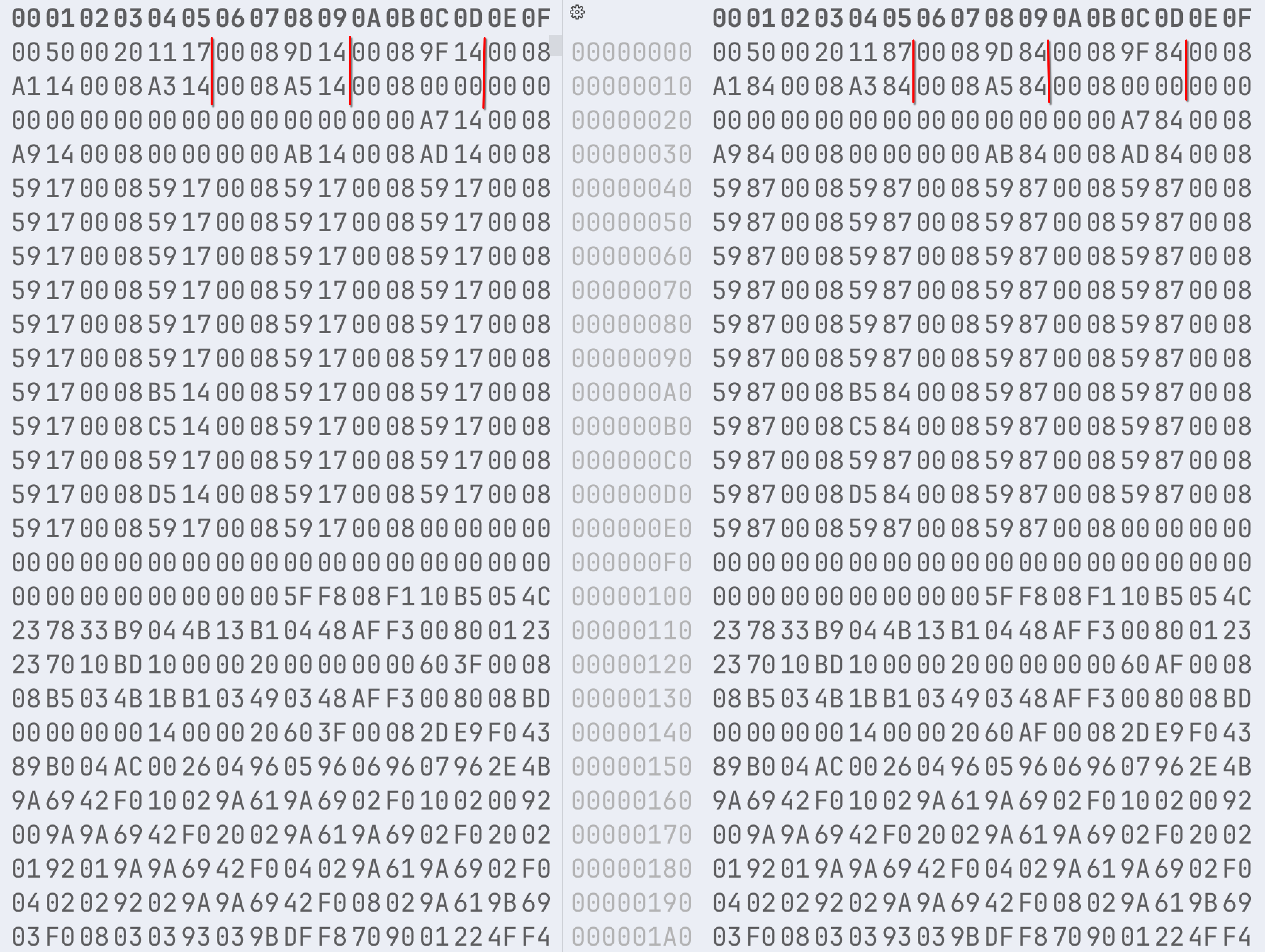 从划分区间的数据段区别能明显看出头部数据段不同。如果我们单纯将同一个程序(编译时设定烧入同一flash区域)烧入到不同的区域,即使Bootloader将程序跳转到正确位置,在程序读取开头字段时,中断就又会跳转回原先的区域。这意味着在编写新程序时,我们需要提前知晓烧录目标地址进行编译,否则就会出现区域跳转错误的现象。这对于后续OTA升级非常不方便,因此无法直接使用该方法。
解决方法
1.针对头字段在程序中进行修改[不具备可复用性]
这种方法就是在程序内,根据flag区域所保存的OTA目标地址,修改待OTA程序的头字段。上图中对比数据也可以知道,头字段会在特定区间重复一个字段值。该字段值大致是\(程序烧写目标地址+某偏移量\)。但具体这个偏移量是多少,笔者暂时没有找到规律,不同的程序似乎不一样。考虑到项目尽可能要剔除这种不稳定因素,所以该方案暂时没有采用。
2.修改方案: 程序区+下载区
简单来说就是要避开向不同区域的跳转,尽量每次启动固定向一个区域跳转即可。设定A区为APP,运行OTA时将程序下载入B区,然后向flag区写入OTA标志信息和CRC校验码信息,通过看门狗重启。在Bootloader程序中去验证B区程序的正确性,然后再复制到A区中执行,随后重置flag区信息。
当然,上面的方案会有运行稳定性方面的问题:需要进行OTA时Bootloader的启动效率会下降,同时也很难保证复制程序的正确性。所以最好能够使用外置eeprom或者flash来解决OTA程序暂存的问题。
实习过程中对STM32G0系开发板OTA功能开发时遇到的一些问题和解决办法,主要涉及Bootloader程序的跳转和APP分区思路问题。
- Bootloader 跳转到APP区后发生卡死的情况。
- 双APP分区时只能跳转到其中某一个分区,无法跳转到另一分区的情况。
During internship OTA development on an STM32G0 board, I ran into several issues and summarized the fixes, mainly around Bootloader jump logic and APP partition strategy.
- The system hangs after Bootloader jumps to the APP region.
- With dual APP partitions, Bootloader can jump to only one partition instead of both.
- System Hangs After Bootloader Jumps to Application
- Bootloader Can Only Jump to One of the Dual APP Partitions
System Hangs After Bootloader Jumps to Application
Let's briefly explain the program jump operation: it involves setting the PC pointer position + stack pointer position. The PC pointer should point to the address[program burning address] + 4. For
CBT6-suffixed development boards, the HAL library code can refer to the
following lines:
1 |
|
addr is within RAM. During actual execution, it was found
that the program successfully jumped and ran, but it would get stuck in
certain places and could not proceed. The reason is simple: we
redirected the PC pointer and stack pointer, but did not relocate its
interrupt vector pointer. This causes the APP program, when
encountering an interrupt function during execution, to jump back to the
Bootloader's interrupt vector table, which naturally leads to the
program pointer going astray. By default, the program's interrupt vector
table pointer points to 0x0, but the actual program's interrupt vector
table starts at the program's starting address. Refer to the diagram
below:
Solution
In Cortex M series chips, except for M0, other chips retain the VTOR register for relocating the interrupt vector pointer. The G0 series development board uses an M0+ chip, which can use this register. Therefore, before jumping, simply assign the corresponding address to the VTOR register. According to the diagram above, the vector table address is the program's starting location. The complete jump function code is as follows:
1 |
|
Bootloader Can Only Jump to One of the Dual APP Partitions
Dual APP partitioning was the first method I conceived to implement OTA without an EEPROM, which means dividing into Bootloader + flag + AB areas. The OTA update idea is as follows: 1. The program starts and defaults to entering Area A; 2. An OTA request occurs, and the new program is written to Area B; 3. If the write is successful, the flag at the corresponding address in the flag area is set to valid; 4. The program enters an infinite loop, and the system is rebooted by the watchdog; 5. After the Bootloader verifies the program, it jumps to Area B for execution, at which point Area A becomes the new download area.
The advantage of the above method is that it always ensures one partition has an executable program, so even if OTA fails or the write is forcibly interrupted, there is still a valid area that can be executed. In addition, it effectively utilizes the program flash space, reduces the number of erase/write cycles for a single area, and extends flash lifetime.
However, the above method overlooks the program's own address pointer
issues. After compiling with various tools, the binary executable file
we obtain actually retains information such as the program's starting
address. This address information is generally at the beginning of the
.bin file (which is essentially the interrupt vector table
address mentioned in the previous issue). When the hardware executes the
.bin program, it first reads this address information and
jumps to the corresponding location to execute. In reality, if we set
different burning locations for the same program, the compiled
.bin files generated will be different. The comparison
below can make this more intuitive: From the differences in the data segments of the
divided sections, it is clear that the header data segments are
different. If we simply burn the same program (compiled to be flashed
into the same flash region) into different regions, even if the
Bootloader jumps the program to the correct location, when the program
reads the initial fields, the interrupt will jump back to the original
region. This means that when writing a new program, we need to know the
target burning address in advance during compilation, otherwise, region
jump errors will occur. This is very inconvenient for subsequent OTA
upgrades, so this method cannot be used directly.
Solution
1. Modifying Header Fields in the Program [Not Reusable]
This method involves modifying the header fields of the OTA program
within the program itself, based on the OTA target address stored in the
flag area. From the comparative data in the image above, it can also be
seen that the header field repeats a certain value in a specific range.
This field value is roughly
program burning target address + some offset. However, I
have not yet found a pattern for what this specific offset is; it seems
to vary for different programs. Considering that the project aims to
eliminate such unstable factors as much as possible, this solution has
not been adopted for now.
2. Modified Scheme: Program Area + Download Area
Simply put, the goal is to avoid jumping to different regions and try to always jump to a fixed region upon each startup. Set Area A as the APP area; when running OTA, download the program to Area B, then write OTA flag information and CRC checksum information to the flag area, and reboot via the watchdog. In the Bootloader program, verify the correctness of the program in Area B, then copy it to Area A for execution, and finally reset the flag area information.
Of course, the above scheme has issues regarding operational stability: the Bootloader's startup efficiency will decrease when OTA is needed, and it's also difficult to guarantee the correctness of the copied program. Therefore, it's best to use external EEPROM or flash to solve the problem of temporary storage for OTA programs.